Guest List
Report parameters
|
Field |
Description |
|---|---|
|
Report Name |
The name of the report. |
|
Name/Room No Generates guest list by name/room no. |
|
|
Building Codes |
A drop-down list consisting of all the building codes. All building records created in the Building Codes (Settings à Setup à Room à Building Codes) screen are displayed as options in the drop-down list. Users can select multiple or all the building codes from the list to be displayed in the report generated. |
|
Report Print Options |
Available options include:
This section will also be displayed as a report parameter when generating the Guest List By Arrival Time report. |
|
Include Comments |
When enabled, reservation comments (if any) will be displayed in the Comments field of the report. |
|
Include Special Instruction |
When enabled, special instructions (if any) for each reservation will be displayed in the Special Instruction field of the report. |
|
Sort By Building |
When enabled, the system sorts the records by building codes. |
|
Display Extensions |
When enabled, the system allows extensions to be displayed in the report. |
|
Include Non Bedded Room Type |
When enabled, the system includes the non-bedded rooms associated with the available room types. |
|
Display Additional Columns |
|
|
Display Comp Accounting Info |
When enabled, the system displays comp accounting in the report. |
|
Sort Options |
Available options include the following:
|
|
Display Contact Information |
When enabled, contact information for each reservation will be displayed in the report. |
|
Include Additional Guests |
When enabled, additional guests (if any) for each reservation will be displayed in the report. |
|
Arrival Time Generates guest list by arrival time. |
|
|
Start Date |
The start date from when the data must be considered for generating the report. |
|
End Date |
The end date until when the data must be considered for generating the report. |
|
Sort By Arrival Time |
When enabled, the system sorts the report by the guest arrival time. |
|
Include Additional Guests |
When enabled, additional guests (if any) for each reservation will be displayed in the report. |
|
Display Contact Information |
When enabled, contact information for each reservation will be displayed in the report. |
|
Report Print Options |
Available options include:
|
|
Display Additional Columns |
|
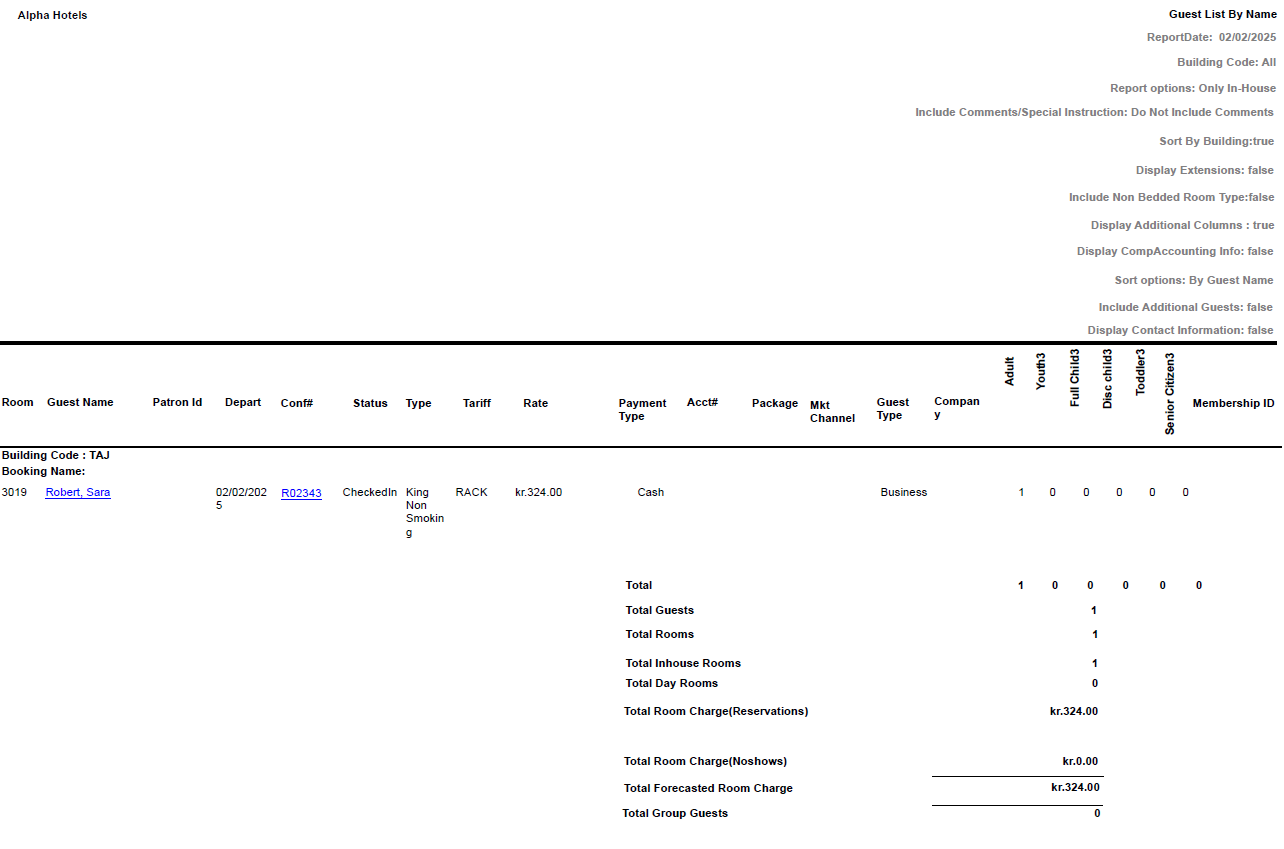
Sample Report - Guest List By Name
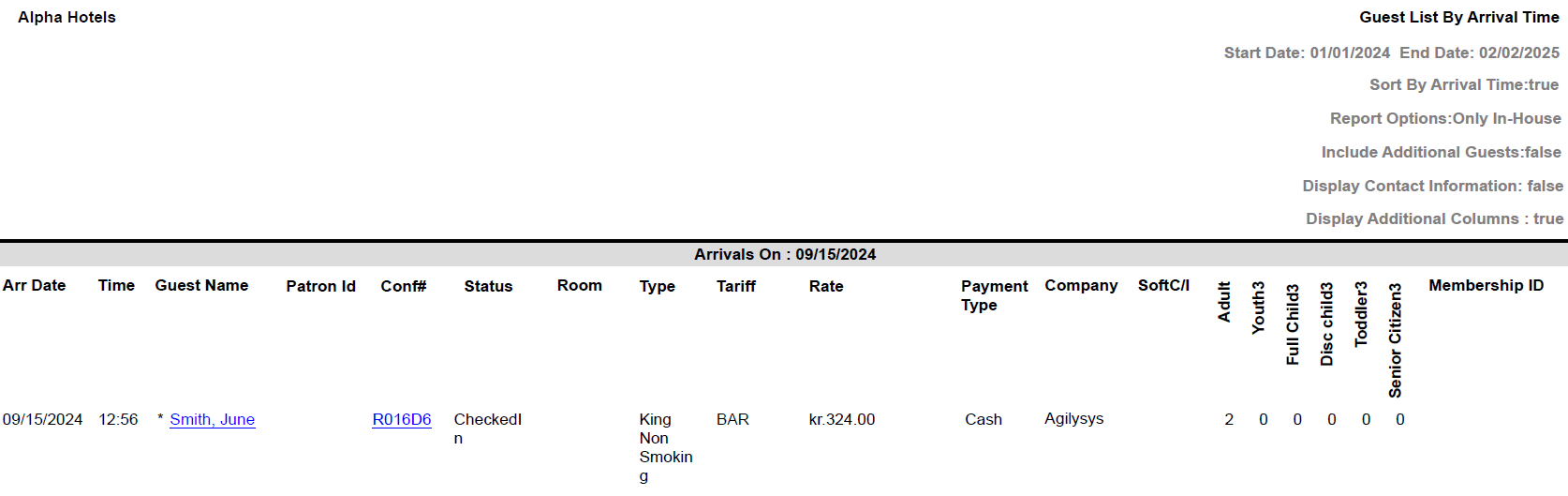
Sample Report - Guest List By Arrival Time
Report Fields
|
Field |
Description |
|---|---|
|
Room |
The room number of the guest. |
|
Guest Name |
The first name and the last name of the guest will appear as a hyperlink and clicking it will navigate the user to the guest record. |
|
Depart |
The date of departure of the guest. |
|
Conf # |
The confirmation number of the guest will appear as a hyperlink and clicking it will navigate the user to the reservation record. |
|
Status |
The status of the reservation. |
|
Type |
The room type to which the room number belongs. |
|
Tariff |
The tariff selected for the reservation. |
|
Rate |
The room rate of the reservation. |
|
Payment Type |
The payment type used for the reservation. |
|
Acct # |
The account number of the account associated with the guest. |
|
Package |
The package associated with the reservation. |
|
MKT Channel |
The market channel selected for the reservation. |
|
Guest Type |
The guest type selected when creating the reservation. |
|
Company |
The name of the company to which the guest belongs. |
|
Adult |
The number of adults on the reservation. |
|
Youth |
The number of youths on the reservation. |
|
Full Child |
The number of children not eligible for discount on the reservation. |
|
Disc Child |
The number of children eligible for discount on the reservation. |
|
Toddler |
The number of toddlers on the reservation. |
|
Senior Citizen |
The number of senior citizens on the reservation. |
|
Building Code |
The building where the guest room is located. |
|
Building Name |
The name of the building. |
|
Patron Id |
The patron ID of the associated guest in the reservation. This option is only displayedx if the report is generated by enabling the Display Comp Accounting Info Flag. |
|
Arr Date |
The date of arrival of the guest. |
|
Time |
The arrival time of the guest. |
|
Soft C/I |
Check-in without a room assignment. |
|
Total |
The totals for each age category are displayed. |
|
Total Guests |
The total number of guests for all reservations. |
|
Total Rooms |
The total number of rooms for all reservations. |
|
Total Inhouse Rooms |
The total number of in-house room reservations. |
|
Total Day Rooms |
The total number of day room reservations. |
|
Total Room Charge(Reservations) |
The total room charges for reservations in the Reserved status. |
|
Total Room Charge(No Shows) |
The total room charges for reservations in the No Show status. |
|
Total Forecasted Room Charge |
The total room charges forecasted for reservations in the Reserved and No Show statuses. |
|
Total Group Guests |
The total number of guests for group reservations. |